App development · 10 min read
Why does my app look small on iPhone Duo? (And how to fix it)
Customers say your app looks small or boxed in on iPhone Duo? Why it happens, why a quick rebuild can break screens, and what a proper fix involves.
On this page
- Why does my app look small on iPhone Duo?
- Which of the three cases is your app in?
- Will Apple fix it, or do I have to?
- Why can't my developer just rebuild it with the new SDK?
- What does a proper iPhone Duo fix involve?
- What is the risk of leaving it on a ₹2,99,900 phone?
- How much does fixing it cost?
- How Digital Architect handles iPhone Duo fixes, end to end
- Frequently asked questions
- About the author
- Sources
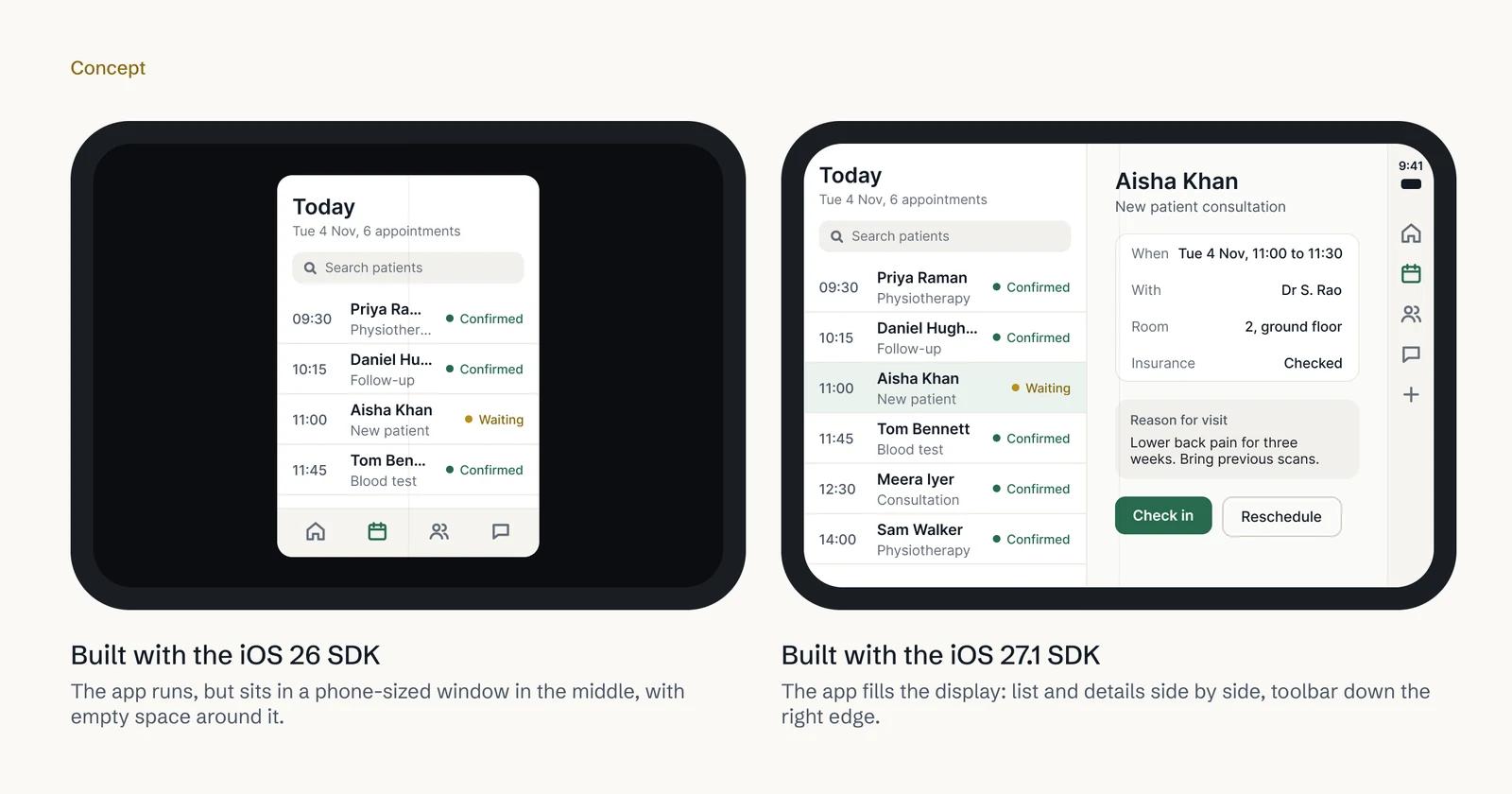
Your app looks small on iPhone Duo because it was built with Apple's iOS 26 SDK or earlier. iPhone Duo runs those apps in a compatibility mode: when the phone is open, the app sits in the centre of the inner display with empty space around it. It is not a bug, and it won't fix itself. The fix is a careful update on the iOS 27.1 SDK, with every screen checked for both displays.
This article is for app owners whose customers have started asking why the app looks wrong on their new iPhone Duo.
Why does my app look small on iPhone Duo?
iPhone Duo is Apple's first foldable iPhone. It went on sale on 23 October 2026, with a 5.4-inch outer display and a 7.6-inch inner display, and it runs iOS 27.1.
Every iPhone app is built with a particular version of Apple's software development kit, the SDK. Think of it as the toolbox your developer used for the build that is in the App Store now. An app built with an older toolbox doesn't know that a phone can unfold into a much wider screen.
So iPhone Duo doesn't stretch those apps to fit. Apple's Prepare your app for iPhone Duo page (accessed Nov 2026) explains that hard-coded screen sizes and assumptions about the device can cause stretched, clipped or misplaced content. For apps built with the iOS 26 SDK or earlier, it describes what people see instead:
- Open: the app appears in the centre of the inner display, with empty space around it.
- Closed: the app's content sits to the left of the status bar and camera on the outer display.
Your customers may call this "black bars", "empty space" or "the app doesn't fill the screen". They are all describing the same thing. Nothing is wrong with their phone, and nothing is wrong with your app's features. It simply hasn't been built for this shape of screen yet.
Which of the three cases is your app in?
Apple's guidance sets out three cases, depending on the SDK your current App Store build used.
| Last built with | What customers see on iPhone Duo |
|---|---|
| iOS 26 SDK or earlier | The boxed look: centred on the inner display, empty space around it. |
| iOS 27 SDK | The app fills most of the inner display, but keeps clear of the status bar on the right edge. Better, but not finished. |
| iOS 27.1 SDK or later | Optimised for iPhone Duo: the full display is used, and toolbars and tab bars appear vertically below the status bar. |
To find out which case applies, ask your developer, or whoever has access to App Store Connect, which SDK built the current release. Your App Store page gives a second clue. Apple shows a badge on the product page of apps that have submitted iPhone Duo screenshots. If your page has no badge, nobody has done the iPhone Duo work yet.
Will Apple fix it, or do I have to?
You do. The boxed look is how iPhone Duo is designed to handle apps that haven't been updated, and it is tied to the SDK your app was built with. It changes only when you ship a new build on a newer SDK.
There is also a date to plan around. From April 2027, Apple requires new uploads to App Store Connect to be built with the iOS 27 SDK or later. So even if you don't care about iPhone Duo, your next update after April 2027 forces part of this move. Apple has also said that from April 2027, apps submitted will need iPhone Duo screenshots. Our article on what iOS 27 means for app owners covers the deadlines in full.
Why can't my developer just rebuild it with the new SDK?
This is the trap. It is tempting to open the project in Xcode 27.1, press build and ship. Sometimes that works. Often it doesn't, and the result can look worse than the boxed version.
The reason is in Apple's own guidance. With the iOS 27.1 SDK, toolbars and tab bars move from the bottom of the screen to a vertical strip at the side. Apple says that before you ship a build made with the iOS 27.1 SDK, you should make sure your app's content adapts to the bars becoming vertical. Screens designed around a bottom bar can end up cramped, clipped or covered.
Apple also lists the patterns in older code that cause stretched, clipped or misplaced content once an app is allowed to resize:
- Measuring the whole screen instead of the app's own window. On iPhone Duo the app's window changes size, and is not always the size of the screen.
- Checking the size once, at launch. The phone can fold or unfold while someone is using your app. A half-filled form or a checkout has to adjust without losing what they typed.
- Choosing a layout from portrait or landscape. Apple tells developers to decide the layout by comparing the width and height of the space available, not the phone's orientation.
- Assuming a wide screen means an iPad, or looking for exact iPhone sizes. On iPhone Duo, an iPhone app can be wide. Code that switches to an iPad layout, or checks for known screen heights, gets it wrong.
- Full-bleed photos and video set to fill the screen. On the wider display these can crop out the thing that matters: a product, a face, a caption.
Apple gives developers a "resizability skill" in Xcode that scans a project for these patterns. Apple says it finds most issues, but not all, and that the list should be reviewed by hand. Apple also says apps built on standard SwiftUI and UIKit components adapt automatically to each display. The more custom your screens, the more a person has to check.
What does a proper iPhone Duo fix involve?
A proper fix is not a redesign of your app. It is a careful pass through every screen, so each one works at every size the phone can take. In practice it has seven parts.
- Move to the iOS 27.1 SDK. Update the project and its third-party libraries so they build with Xcode 27.1, which Apple says adds development support for iPhone Duo.
- Lay out every screen for both displays. The outer display is close to a normal iPhone. The inner display is much wider. Lists, forms and product pages need layouts that use the extra space well, not just stretch.
- Handle the poses. iPhone Duo can be closed, open, half-folded and rotated. Apple gives an example of the MLB app playing a live game on the upright half while stats fill the half resting on the table. Not every app needs that, but every screen should survive each pose.
- Rework the vertical toolbars and tab bars. Each screen with a bottom bar is checked and adjusted so the side bar doesn't cover content or buttons.
- Allow for Split View. Apple's Split View lets people open two apps side by side on iPhone for the first time. Your app may be given half the screen, so narrow layouts must hold up too.
- Test. Apple's tools here are the iPhone Duo simulator in Xcode 27.1, which Apple calls "the best way to test the full native experience", the resizable simulator in Device Hub, and iPhone Mirroring on macOS 27. Then your team tries working builds on real iPhones through TestFlight, Apple's testing app.
- New screenshots and Apple's review. iPhone Duo screenshots are designed and uploaded in App Store Connect, which earns the badge on your product page. Then the update goes to Apple for review. Our guide to iPhone Duo App Store screenshots explains the sizes.
Design comes before code. We draw the key screens for each display and pose in Figma first, so you can see and approve how the app will look before anyone changes it.
What is the risk of leaving it on a ₹2,99,900 phone?
iPhone Duo starts at ₹2,99,900 in India, £1,999 in the UK and $1,999 in the US. The people opening your app on it have just bought one of the most expensive phones on sale, and they are often your most valuable customers.
Leaving the boxed look in place carries real costs, even if they don't show up on a dashboard straight away:
- It looks unfinished. A small app in the middle of a large screen tells a customer the business hasn't kept up.
- Complaints become reviews. A customer who is annoyed enough to email support may also say so in an App Store review, where every future customer reads it.
- You miss the badge and the shelf. Apple says optimised apps show a Made for iPhone Duo badge on their product pages, and it has announced editorial collections for iPhone Duo apps and games. A boxed app qualifies for neither.
- The deadline doesn't move. From April 2027 your next update needs at least the iOS 27 SDK anyway. Doing it calmly now costs less than doing it in a rush later.
How much does fixing it cost?
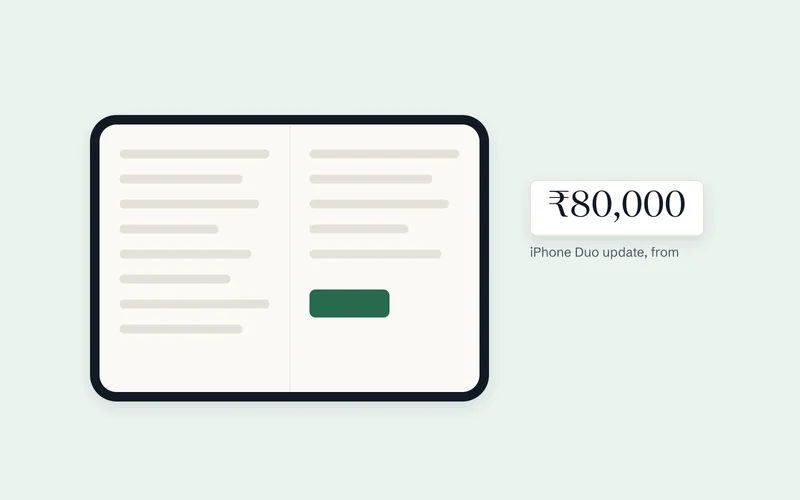
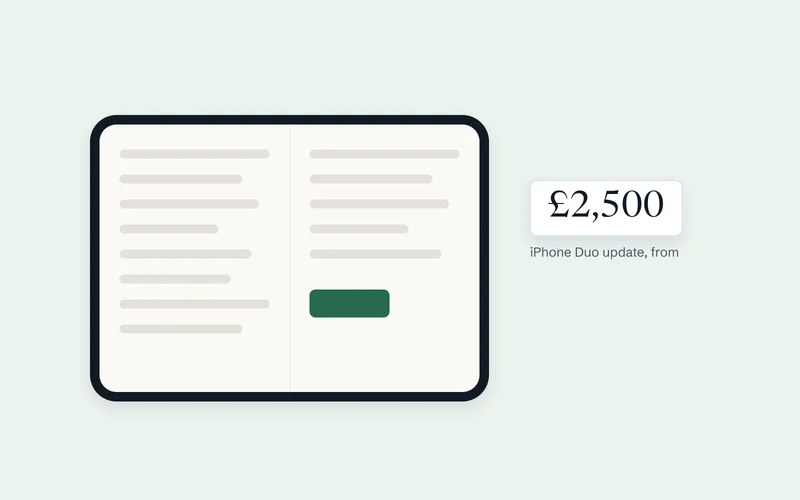
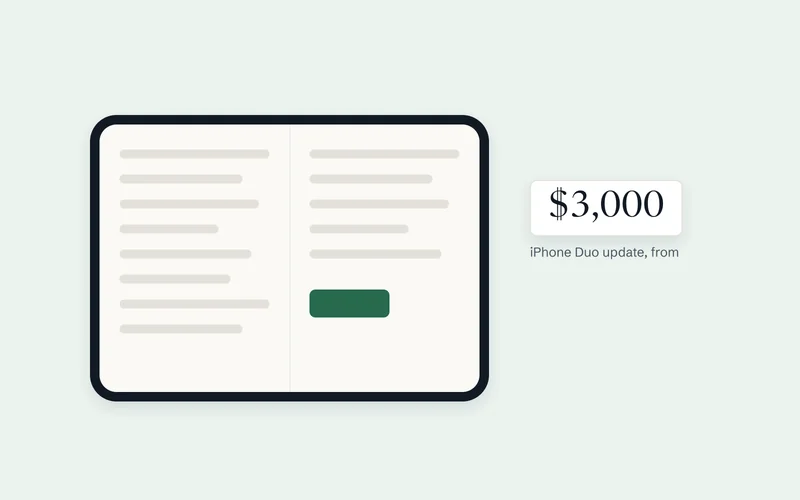
Most apps need an update, which starts from ₹80,000 in India, £2,500 in the UK or US$3,000 elsewhere. If the code is old or built on an abandoned framework, a rebuild may cost less in the long run: from ₹2,50,000, £4,000 or US$4,500. A new app, ready for iPhone Duo from day one, starts from ₹3,00,000, £8,000 or US$10,000.
For more detail in your currency, see our cost guides for India, the UK and the US. These are starting prices. Your final price is fixed in writing after a free 30-minute call, with a written plan within 5 to 7 business days.
How Digital Architect handles iPhone Duo fixes, end to end
You don't need to manage a developer, a designer, a tester and the App Store separately. We do all of it. The full service is on our iPhone Duo app development page.
- A free iPhone Duo check. Send your App Store link with the form below this article. Within two working days we email back what your app most likely needs and a likely cost. It is an estimate, not a fixed price.
- A free 30-minute call to go through the findings and your plans.
- A written plan and fixed price within 5 to 7 business days, agreed before work starts.
- Design in Figma first. You approve your key screens on both displays and when half-folded.
- The SDK move and screen-by-screen fixes, in Swift and SwiftUI for native iOS apps, or Flutter for cross-platform apps, depending on how your app is built.
- Testing in Apple's simulators and on your phones. You get weekly progress and a working build every two weeks through TestFlight, to try on your own iPhones.
- Screenshots and submission done for you. We design the iPhone Duo screenshots, upload them and handle Apple's review.
- Everything in your name. Code, Apple developer account and App Store Connect stay with you. If we need access to personal data, we sign a written data processing agreement first, in line with UK GDPR and India's DPDP Act 2023. For US health data, we sign a business associate agreement under HIPAA before we touch any. Health apps get extra care: see our healthcare app development page.
We work remotely with clients in India, the UK, the US and elsewhere. Calls run from 11 am to 11:30 pm IST every day: 5:30 am to 6 pm UK time (6:30 am to 7 pm in BST), or until 1 pm Eastern (2 pm in summer) for US clients.
Our proof is in shipped work. We designed and built Bharosa, a mental-health platform in India with a patient app, a doctor app and a care portal, more than 350 screens in all; the patient app reached the App Store and Google Play in 10 weeks. For Build-Hive, a construction SaaS for builders in Oxfordshire, we built the core platform in 12 weeks, with the web platform live and native iOS and Android apps built and tested.
Frequently asked questions
Is my app broken on iPhone Duo?
No. It works as before. Apple shows apps built with the iOS 26 SDK or earlier in the centre of the open display, with empty space around them, so they don't break.
Will customers on other iPhones notice a change?
The layout work is for wider windows, so ordinary iPhones mostly look the same. Building on the new SDK also brings Apple's iOS 27 design refresh, including updated tab and navigation bars, so we check every screen on regular iPhones too.
Will a quick recompile fix it?
Sometimes, but it is risky. On the iOS 27.1 SDK, toolbars and tab bars become vertical, and Apple warns that your content must adapt to that before you ship. Each screen needs checking.
Do you test on a real iPhone Duo?
No. We test in Apple's iPhone Duo simulator, which Apple calls the best way to test the full native experience, and in its resizable simulator. Working builds then go to your own iPhones through TestFlight, including an iPhone Duo if you or your team have one.
Can you fix an app another agency built?
Yes, if you can give us the source code and access to your Apple developer account. If the code is beyond sensible repair, we say so in the plan and price a rebuild instead.
How long does the fix take?
It depends on how many screens your app has and the state of its code. Your written plan states the timeline before work starts.
About the author
Arjun Raj is the founder of Digital Architect, a web, app and digital marketing studio founded in 2023 and headquartered in LB Nagar, Hyderabad, with a studio in Bengaluru. The team builds apps and platforms for clients across India, the US, Canada and the UK. Arjun holds a B.Tech in Computer Science and Engineering, specialising in cybersecurity, from IIT Guwahati. More about Arjun
Sources
- Prepare your app for iPhone Duo – Apple Developer
- Prepare and submit your apps for iPhone Duo – Apple Developer News
- App Store submissions now open for the latest OS releases – Apple Developer News
- Get ready with the latest beta releases – Apple Developer News
- Screenshot specifications – App Store Connect Help, Apple Developer
- Apple unveils iPhone Duo – Apple Newsroom
- Apple unveils iPhone Duo – Apple Newsroom (India)
- Apple unveils iPhone Duo – Apple Newsroom (UK)
- Developers bring incredible new app experiences to iPhone Duo – Apple Newsroom (UK)
- What's new in iOS 27 – Apple Developer
Get a free iPhone Duo check for your app
Send us your app's App Store link. Arjun will check when it was last built, whether it carries the iPhone Duo badge and how its screens are laid out, then email you what it most likely needs (an update, a rebuild or nothing yet) and what that would cost in your currency, within two working days. It's free, with no obligation.