App development · 9 min read
iPhone Duo App Store screenshots: sizes and the April 2027 deadline
iPhone Duo App Store screenshots: Apple's exact sizes, when they become required, how to earn the Made for iPhone Duo badge and what good ones show.
On this page
- What size are iPhone Duo App Store screenshots?
- When do iPhone Duo screenshots become required?
- What is the Made for iPhone Duo badge, and why does it matter?
- Can you just resize your existing screenshots?
- What makes good iPhone Duo screenshots?
- What does it cost?
- How Digital Architect handles iPhone Duo screenshots, end to end
- Frequently asked questions
- About the author
- Sources
iPhone Duo App Store screenshots come in two sizes: 1398 × 2034 pixels for the outer display and 2007 × 2853 pixels for the inner display, in portrait (landscape is the same sizes turned round). They are optional today, but Apple says they become required from April 2027. Apps that submit them get a Made for iPhone Duo badge on their App Store page.
This article is for app owners and marketing managers who look after an app's App Store page and want to get iPhone Duo right.
What size are iPhone Duo App Store screenshots?
iPhone Duo, Apple's first foldable iPhone, went on sale on 23 October 2026. It has a 5.4-inch outer display and a 7.6-inch inner display, and each display has its own screenshot size. Apple's screenshot specifications (accessed Nov 2026) list them as follows.
| iPhone Duo display | Portrait | Landscape |
|---|---|---|
| Outer display (5.4-inch) | 1398 × 2034 pixels | 2034 × 1398 pixels |
| Inner display (7.6-inch) | 2007 × 2853 pixels | 2853 × 2007 pixels |
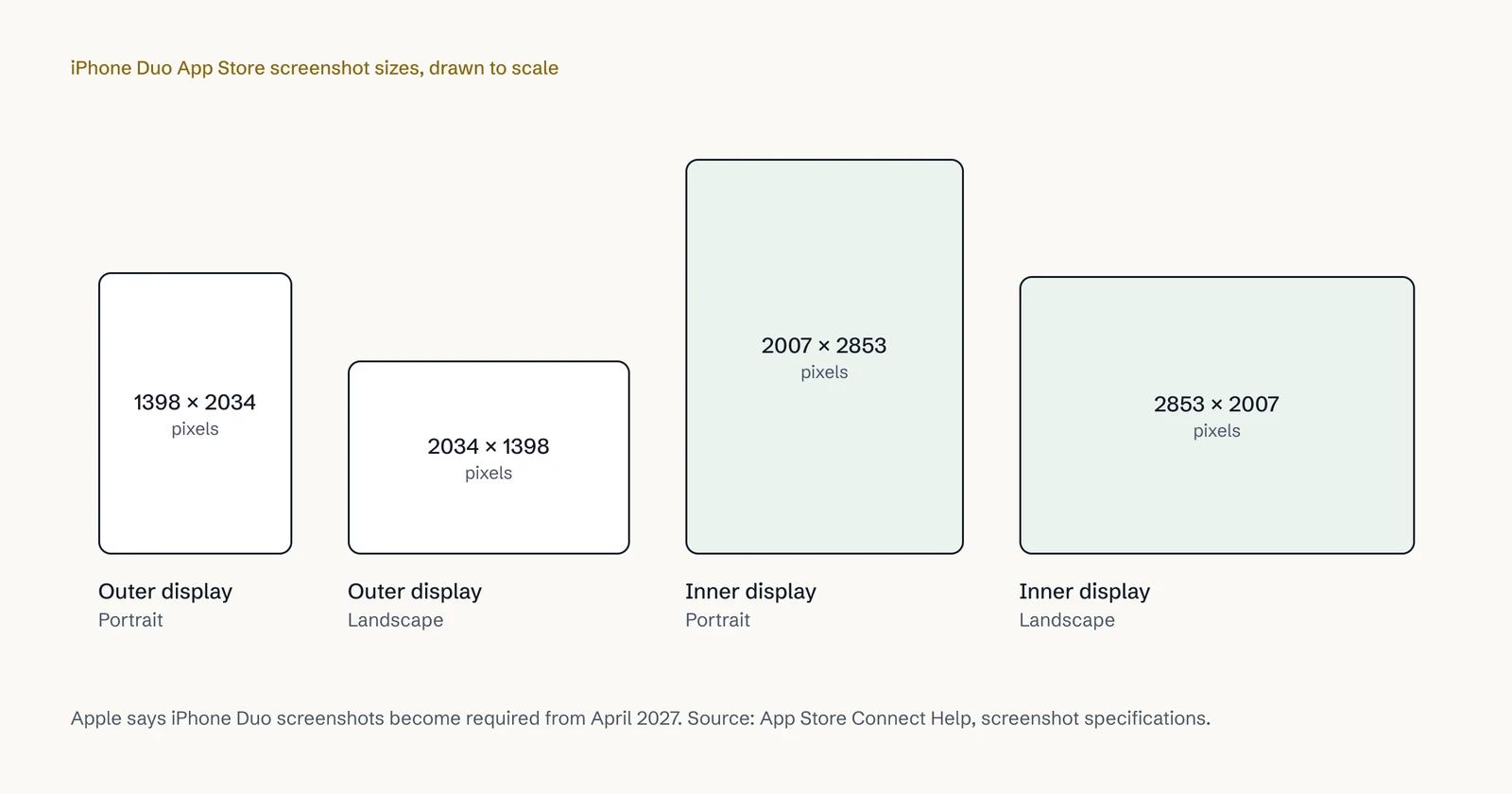
The usual App Store rules apply to both. Apple says you must include at least one screenshot and can upload up to 10 per device size, in .jpeg, .jpg or .png format. Images can't include alpha channels or transparencies.
Notice the shape. Both sizes are much wider for their height than a normal iPhone screenshot, and Apple says the two displays share the same aspect ratio. That matters for design: a screenshot laid out for a tall, thin iPhone will not simply scale up to fit.
When do iPhone Duo screenshots become required?
From April 2027. Apple has worded the rule in two places, slightly differently:
- The screenshot specifications say: "Starting in April 2027, screenshots will be required for any app using the iOS 27.1 SDK or later."
- Apple's October developer news post says: "Starting April 2027, any apps or games submitted will need to include screenshots for iPhone Duo."
There is a second April 2027 rule that links the two. From then, Apple requires apps uploaded to App Store Connect to be built with the iOS 27 SDK or later. So almost any app that ships an update in 2027 will be on a new SDK, and the second wording covers every submission. We plan for the broader reading: if you will submit an update after April 2027, have iPhone Duo screenshots ready.
The SDK is the version of Apple's tools your app was last built with. It also decides how your app looks on iPhone Duo, which our article on what iOS 27 means for app owners explains.
What is the Made for iPhone Duo badge, and why does it matter?
Apple's specifications say that when you submit iPhone Duo screenshots in App Store Connect, your product page "will display a badge to let people know your app is optimized for iPhone Duo". Apple's newsroom calls it "a Made for iPhone Duo badge on product pages across the storefront".
Your product page is where people decide whether to download. Someone browsing on an iPhone Duo has a fair question in mind: will this app look right on my new phone? The badge answers it before they tap Get. An app without one leaves the question open.
The badge also connects to how Apple promotes apps. Apple announced new editorial collections for iPhone Duo apps and games on the App Store. Its guidance also invites developers to submit a featuring nomination and say, in the Helpful Details, that the app is optimised for iPhone Duo, including support for all device poses. An app without iPhone Duo work has nothing to put there.
We won't quote a conversion figure for the badge, because Apple hasn't published one and we won't invent one. The logic is simple, though: on a phone that starts at ₹2,99,900 in India, £1,999 in the UK and $1,999 in the US, buyers expect apps that fit it.
Can you just resize your existing screenshots?
No, for two reasons.
First, the shape is different. Stretching a tall iPhone screenshot to 2007 × 2853 distorts it, and cropping it cuts off content. Neither looks like a premium app.
Second, and more important, the screenshots must show what your app really looks like on iPhone Duo. Apple's asset guidance says: "Show what people can expect." If your app was last built with the iOS 26 SDK or earlier, Apple's Prepare your app for iPhone Duo page (accessed Nov 2026) says it appears in the centre of the open display with empty space around it. A screenshot of a wide, full-screen layout would then promise something your app doesn't do.
So the screenshots come after the layout work, not instead of it. For most apps that means an update on the iOS 27.1 SDK, where the app uses the full display and its toolbars and tab bars appear vertically. If customers are already noticing the boxed look, read why apps look small on iPhone Duo.
What makes good iPhone Duo screenshots?
Good screenshots sell the app in a few seconds. Apple's asset best practices (accessed Nov 2026) give the principles, and iPhone Duo adds a few of its own.
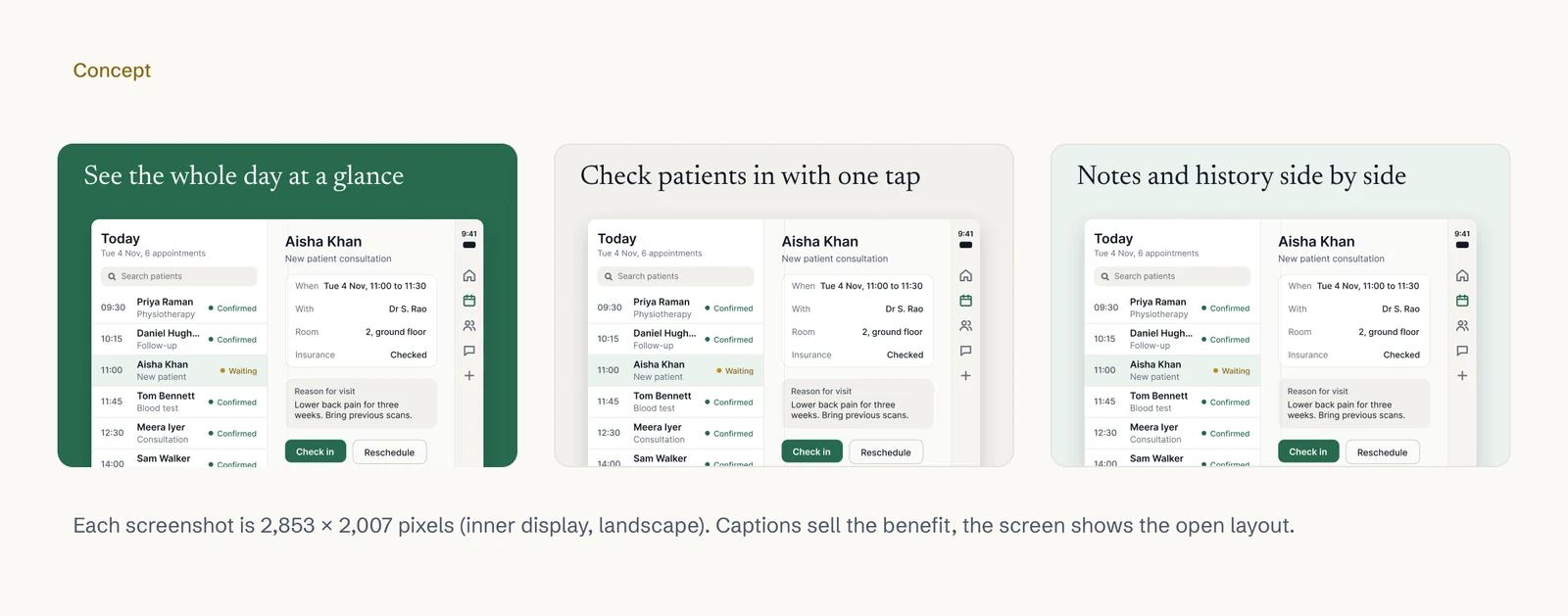
- Lead with the open layout. The inner display is what makes iPhone Duo different. Your first inner-display screenshot should show the wider layout at its best: a list beside its detail, a map beside results, a product beside its options.
- Use real screens and real content. Apple asks for screenshots that depict the app in use and give "a clear, detailed view into the experience". Use realistic sample data, never another person's real data.
- Lead with your best features, in order. Apple says to "Lead with your best features" and sequence screenshots so they tell a story of how someone would use the app.
- Mind the first three. Apple says that, depending on orientation, up to three screenshots can appear in search results. Those three do most of the work.
- Keep captions short. Apple's advice: "use a short phrase that enhances your visual rather than describes it". Write the benefit, not the button name, and keep it legible.
- Leave out what Apple warns against. Apple's guidance says to avoid specific prices, discounts, website URLs and claims that can't be verified, such as awards you haven't received.
- Localise. Apple says you can localise images for each region. If your app runs in Hindi or Welsh, the screenshots should too.
- Respect the safe area. Apple says to "Design key elements with a safe area in mind to accommodate different devices and orientations."
- Do the outer display properly too. Closed, iPhone Duo is close to a normal iPhone. Its set can be simpler, but it must still be made at 1398 × 2034.
- Check it before you submit. App Store Connect has a new preview tool that, Apple says, shows how your screenshots and product page will look on iPhone Duo.
Apple's October post also introduced product page headers, search result assets and an Asset Library in App Store Connect. These are optional, but if you are redesigning your screenshots anyway, it is a good moment to look at them.
What does it cost?
Screenshots are part of every iPhone Duo update we do, along with the layout work they depend on. An update starts from ₹80,000 in India, £2,500 in the UK or US$3,000 elsewhere. A rebuild starts from ₹2,50,000, £4,000 or US$4,500, and a new app ready for iPhone Duo from day one from ₹3,00,000, £8,000 or US$10,000.
For a fuller cost breakdown in your currency, see our guides for India, the UK and the US. These are starting prices. Your final price is fixed in writing after a free 30-minute call, with a written plan within 5 to 7 business days.
How Digital Architect handles iPhone Duo screenshots, end to end
Screenshots sit at the end of a chain: design, code, testing, App Store and launch. We handle the whole chain, so the pictures on your product page match the app people download. The full service is on our iPhone Duo app development page.
- A free iPhone Duo check. Send your App Store link with the form below this article. Within two working days we email back what your app most likely needs and a likely cost. It is an estimate, not a fixed price.
- A free 30-minute call to go through the findings, your audience and the markets you sell in.
- A written plan and fixed price within 5 to 7 business days, agreed before work starts.
- Layouts designed in Figma first, for both displays and the half-folded pose, and approved by you.
- The update itself, in Swift and SwiftUI for native iOS apps or Flutter for cross-platform apps, depending on how your app is built.
- Testing. We test in Apple's iPhone Duo and resizable simulators. You get weekly progress and a working build every two weeks through TestFlight, to try on your own iPhones.
- Screenshots designed and uploaded for you. We capture the real screens, design both sets with captions in Figma, localise them if needed, check them in Apple's preview tool and upload them to App Store Connect.
- Submission and featuring. We handle Apple's review and, if you want, the featuring nomination.
- Everything in your name. Code, Apple developer account and App Store Connect stay with you. If we need access to personal data, we sign a written data processing agreement first, in line with UK GDPR and India's DPDP Act 2023. For US health data, we sign a business associate agreement under HIPAA before we touch any.
- After launch, if you want it. App Store optimisation, SEO and ads, so the new page keeps working. Our guide on getting your first app users covers what comes next.
We work remotely with clients in India, the UK, the US and elsewhere. Calls run from 11 am to 11:30 pm IST every day: 5:30 am to 6 pm UK time (6:30 am to 7 pm in BST), or until 1 pm Eastern (2 pm in summer) for US clients.
We have done launches end to end before. We designed and built Bharosa, a mental-health platform in India with a patient app, a doctor app and a care portal, more than 350 screens in all; the patient app reached the App Store and Google Play in 10 weeks. For Build-Hive, a construction SaaS for builders in Oxfordshire, we built the core platform in 12 weeks, with the web platform live and native iOS and Android apps built and tested.
Frequently asked questions
What are the iPhone Duo screenshot sizes?
1398 × 2034 pixels for the outer display and 2007 × 2853 pixels for the inner display, in portrait. In landscape, the same sizes are turned round: 2034 × 1398 and 2853 × 2007.
Are iPhone Duo screenshots required now?
Not yet. Apple says they become required from April 2027. Until then they are optional, but they earn the Made for iPhone Duo badge.
How do I get the Made for iPhone Duo badge?
Submit iPhone Duo screenshots in App Store Connect. Apple says your product page then displays a badge showing the app is optimised for iPhone Duo. Make sure the app really is optimised first.
How many iPhone Duo screenshots can I upload?
At least one and up to 10 per device size, in .jpeg, .jpg or .png, with no transparency.
Can I upload iPhone Duo screenshots without updating my app?
You shouldn't. Screenshots must show what people can expect, and an app built with the iOS 26 SDK or earlier appears boxed in on the open display. Update first, then capture the real screens.
Do you design screenshots for apps you didn't build?
Yes, as part of an iPhone Duo update. We need the source code and access to your Apple developer account and App Store Connect.
About the author
Arjun Raj is the founder of Digital Architect, a web, app and digital marketing studio founded in 2023 and headquartered in LB Nagar, Hyderabad, with a studio in Bengaluru. The team builds apps and platforms for clients across India, the US, Canada and the UK. Arjun holds a B.Tech in Computer Science and Engineering, specialising in cybersecurity, from IIT Guwahati. More about Arjun
Sources
- Screenshot specifications – App Store Connect Help, Apple Developer
- Prepare and submit your apps for iPhone Duo – Apple Developer News
- App Store submissions now open for the latest OS releases – Apple Developer News
- Showcase your apps with new assets on the App Store – Apple Developer News
- Prepare your app for iPhone Duo – Apple Developer
- App Store asset best practices – Apple Developer
- Apple unveils iPhone Duo – Apple Newsroom
- Apple unveils iPhone Duo – Apple Newsroom (India)
- Apple unveils iPhone Duo – Apple Newsroom (UK)
- Developers bring incredible new app experiences to iPhone Duo – Apple Newsroom (UK)
Get a free iPhone Duo check for your app
Send us your app's App Store link. Arjun will check when it was last built, whether it carries the iPhone Duo badge and how its screens are laid out, then email you what it most likely needs (an update, a rebuild or nothing yet) and what that would cost in your currency, within two working days. It's free, with no obligation.